How I learned to read again
I hate feeling as though I’m missing out. A great gig, a party with old friends, a family get-together, the latest episode of an alleged ‘talent’ show where delusional members of the public sing other people’s shit songs in a badly-orchestrated attempt to make us feel better about our own mediocrity. Okay, maybe not that last one.
As designers, we subscribe to RSS feeds so we don’t miss out on the next inspiring article or nugget of advice. We read hoping it’ll help us improve, learn more or think differently in some way. And why not? Hunger for knowledge and growth is essential, and there is sure as hell enough brilliant writing on the web there to deliver it. But I’ve always struggled with making enough time to consume it, even a fraction of it.
Time to do something about it
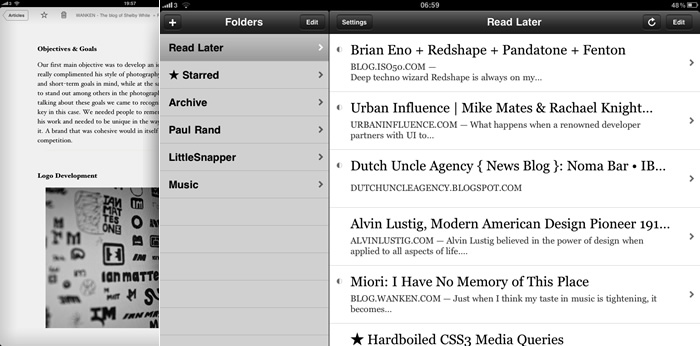
Having used (and subsequently dropped) both Netvibes and Shaun Inman’s Fever in the past, the last few months have been nothing short of a revelation for me. I began using Instapaper to save articles I found through Twitter during the day, reading them on the iPad at night. Ditching the desktop made such a difference; it was like sitting down to read a magazine. The next step was RSS.
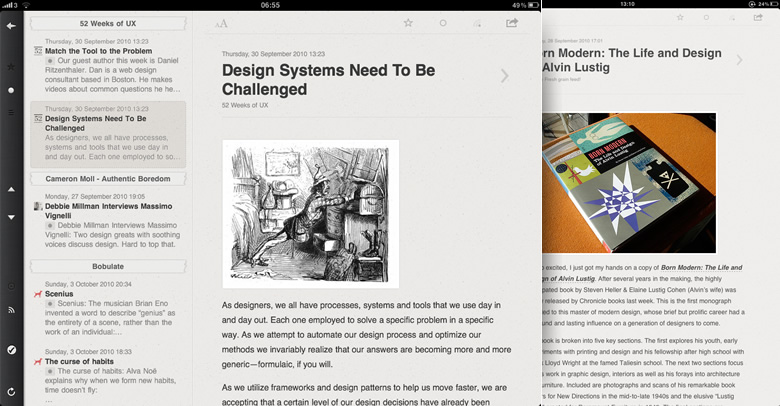
I imported my Fever feeds into Google Reader and deleted all but my most essential, going from 149 down to 40. After hearing good things about Reeder for iPad, I picked it up and was quickly taken with it’s functional, yet somewhat charming, interface.
Now between Instapaper-ing select articles during the week and letting articles from my relatively small number of feeds build up in Reeder, my weekly ‘magazine’ is curated. Come Saturday morning, I open Reeder and dive in.
Anything I might reference in future gets bookmarked into my Delicious account from within Reeder. Music-related posts not already using the HTML5 <audio> element are moved to a Music folder within Instapaper for later listening in a Flash-enabled browser. Posts with inspiration-worthy visuals get added to a LittleSnapper folder in Instapaper, ready to be snapped when I get back to my desktop machine.
Having sieved select articles from Reeder through to Instapaper, they’re all read then bookmarked and/or archived. And that’s it. Sometimes it’s an hour-and-a-half, sometimes it’s a couple of hours dotted throughout the day. Always a belly full of content.
Lessons worth learning
Reading in portrait-mode (where there’s no sidebar menu) is key for me, because it means I can’t just skip articles. I’m forced to read sequentially, processing each one equally. Exposing yourself to articles you wouldn’t normally read is healthy, like when you come across a random article in a newspaper and ‘accidentally’ end up reading it.
Being realistic about just how much you can sensibly consume is paramount. It might mean ditching a chunk of your feeds to find a good balance initially, but if you’re frustrated with the state of your reading I think it’s a sacrifice worth making.
I think if I had an iPad I’d do exactly the same, but unfortunately my financial situation dictates that I can’t afford it! I did however dive in and pick up a Kindle – and although mine is broken right now (getting replacement in a few days) I’ve also been getting back into RSS.
I don’t use RSS – I just pick things up throughout the day on Twitter – either via Tweetie on my laptop or on the go on my iPhone. Anything I like is then sent across to Instapaper. Then every week or so (usually a Saturday) I log in-to Instapaper, and from there it allows you to d/l all your articles in Kindle format, so I do that and then put them on the Kindle. Then I read whenever I have time to – and once I’ve used up all the articles, the next time I want to read something, I again log on to Instapaper and download my latest set of items.
It’s got me back into reading – despite mine having a fault I would recommend a Kindle to everyone – I have not read many books or RSS feeds for a long time, but after a couple of weeks with the Kindle and Instapaper combination, I’m reading more than ever.
Superb post Robbie!
Jack, I don’t honestly think the specific device matters all that much. What’s important is that you’re in the right mindset: relaxed and ready to read. I imagine there are plenty of people who’ll manage fine with a laptop or even desktop machine, I just have a bad habit of getting distracted too easily!
Hey Robbie,
The individual device might not matter in general, but for me (and it sounds like you as well!) it really does. With the Kindle I sit down, away from Twitter etc and just read. Without it I would never do it – I also just don’t like reading on my laptop in general, but that’s more personal preference.
Great insights Robbie, I’m exploring the purchase myself but I’m torn with the upcoming Android tablets coming soon.
I was just going through your portfolio as I too want to make one for me….
I’m still a student so I want an effective portfolio so that i can attract more of companies to recruit me…..
Plz give me some tips to bring out this.
Hello Robbie,
We are currently looking for a casual website designer. I was wondering how you are for availability & how much you charge per/hour.
Regards,
Matthew Maks
Hi Matthew, I’m not currently taking on any new freelance work, sorry!
I got your same problem (well, not really because i don’t use RSS readers, it’s not just into my browsing habits – but i’d like to stay up to much more onto some blogs), and as somebody stated above, i’d do the same if i had a tablet companion. This is the reason i welcomed the iPad and the reason i was throwing around the forums to advocate tablet computers. And it is something i’m doing with my iPod Touch, i sit on the toilet and read our (Italian) national news association website (kindly iPhone optimized) and a few blogs i keep in tabs (and i somehow cry about the too few tabs that can be opened); but it is just too tiring! I mean, the display is too small that you fatigue too much. A tablet would be a killer, but they cost just too much to buy for this main activity.